

Dubai’s retail sector is a competition and dynamic market. Whether it’s small local businesses or expanding retail giants, businesses must keep track of their inventory, handle transactions, keep a watch on spending, and ensure a uniform customer experience.
These activities become challenging to manage when they’re conducted using distinct systems or manually, making it hard to have precise stock management, monitor sales performance, and manage operations in various locations.
These activities can be combined with an integrated ERP system. Retail applications include the point of sale (POS), inventory, sales, purchasing, accounting, and customer relationship management (CRM) business applications in Odoo ERP.
In this blog, we delve into the capabilities of Odoo ERP for retail businesses in Dubai and its ability to support their daily operations and plan their growth.
Odoo ERP for Retail: What is it?
Odoo is an enterprise management system with applications that can be set up to accommodate distinct enterprise processes. Odoo provides relevant applications to retail businesses to handle their sales transactions, stock movements, purchases, and financial and customer information.
Businesses can link workflows between their chosen applications in Odoo, rather than keeping them separate for each activity.
The exact configuration will differ based on the retail company, number of stores, product line, sales channels and need.
1. Supply Odoo POS With Retail Sales Management.
For many retail stores, having a point-of-sale system is at the heart of everyday operations. Staff must make transactions, deal with orders and keep proper sales documents.
All retail transactions can be supported via a connected system with product and inventory information in Odoo POS.
It can be used by retailers to:
- Process customer purchases.
- Use appropriate discounts and pricing rules.
- Manage different payment methods.
- Track sales transactions.
- Review sales activity.
- Link point-of-sale with other Odoo apps.
Automated POS transactions can help minimize the need to record sales separately. During implementation, retailers should evaluate their payment terminals, receipts and other local operational requirements and needs.
2. Improve Inventory Management
Inventory Management is one of the significant aspects of retail business. An excess of stock can tie up working capital, and not having enough stock can result in lost sales and customer dissatisfaction.
Odoo Inventory can serve businesses to keep track of their stocks and manage their product movements.
Retailers have the option to set up inventory workflows to support:
- Products Stock tracking.
- From suppliers/goods received.
- Internal stock transfers.
- Reordering processes.
- Inventory adjustments.
- Current stock levels with all locations.
If your company has several branches or warehouses, the inventory configuration should mirror the transfer of products between branches. Product data accuracy and standard operating procedures play a critical role in reliable product stocks.
3. Run Multiple Offices. Manage Multiple Retail Locations
Retailers with multiple stores may require the ability to track sales and inventory for each store.
Odoo can be set up to help integrate branch-related information to a connected system. This can make it easier for authorised users to keep track of stock movements and sales activity, as well as operational records.
Prior to implementing, companies need to determine the management process of each location, such as:
- Sharing inventory or keeping separate stock.
- How stock transfers are approved and recorded.
- Who is able to see what information at each place of work.
- The way sales and performance are expressed in the branches.
- Decision making processes for buying and replacing items.
It should not be a one-size-fits-all design, but one that reflects the way the retailer actually operates as opposed to how he or she thinks he or she should operate.
4. Generate Online and In-Store Sales
Most retailers operate in both brick and mortar stores and online. They can make it difficult to deal with product information, inventory availability and order processing with these channels.
Odoo offers applications to help retail and eCommerce processes run on a single platform. For businesses, this can be a step towards having consistent product, order and stock data throughout channels, depending on the setup and integrations.
By adopting a connected approach, retailers can help:
- Maintain product information.
- Manage orders and inventory for the online business.
- Analyse sales by channel.
- Manage inventory movements.
- Minimize data duplication.
The integration that needs to be done should be evaluated properly, especially if the retailer is integrating with a marketplace, payment gateway, delivery system or an existing eCommerce platform.
5. Make Purchasing and Supplier Management easier.
In retail, it is important to have a good understanding of when to reorder items and keep track of supplier interactions.
Odoo Purchase will help you to organise Purchase orders, supplier data, purchase workflows, etc. Combined with inventory and accounting, it can streamline the inventory ordering to receipt and financial recording process.
Retailers can review:
- Details about the suppliers and purchasing history.
- Purchase order status.
- Incoming stock.
- Product costs.
- Reordering requirements.
- Supplier Invoices & related Records.
Businesses need to set up rules and levels for purchases in order to make sure that the system matches the level of their internal control.
6. Learn to use reporting to understand Retail Performance
Retail decisions are often made based on what products do sell, when sales shift and which outlets are performing well and which are not.
Odoo’s reporting features enable companies to analyze data from their set applications.
Retail managers can look at reports to analyze:
- By product or product category sales.
- By Date/Sales By Outlet.
- Stock and stock movements.
- Purchasing activity.
- Customer transactions.
- Financial performance – derived from set up accounting information.
The more reliable the data and processes, the more reliable the reports. Retailers need to maintain consistency in product, category, location and transaction data.
7. Support Customer Relationships
Customer experience is a critical aspect of retail. Companies could save the information of their customers and evaluate their buying past, as well as arrange subsequent activities.
Odoo can assist retailers with keeping customer data and linking it to sales actions, contingent on the opted applications and configuration.
Retailers should think about their customer records, their loyalty programmes, promotions and communications and how they want to handle them. Collection of data relating to customer should comply with relevant Privacy and Data-protection obligations.
How to Plan an Odoo ERP Implementation for Your Retail Business
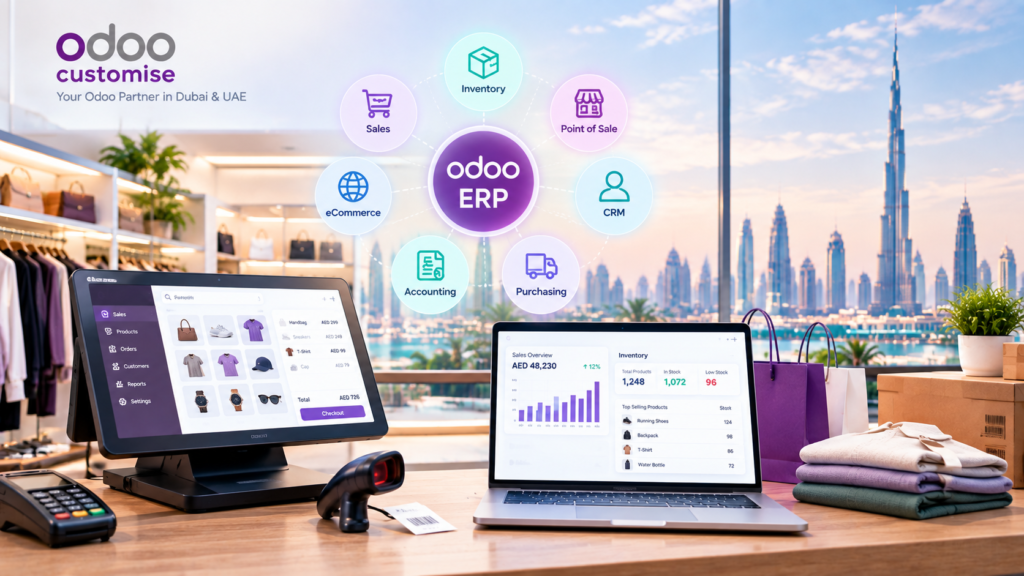
To successfully implement an ERP system in a retail business, follow these steps to plan it strategically.
The first step is to examine your current processes.
Step 1: Examine your current processes.
Record the procedures your business goes through to make sales, maintain stocks, buy goods and record accounts and customer records. Look for repetitive tasks, reporting deficiencies and operational issues.
Step 2: Identify your needs
Identify what your team requires and differentiate between must have features and desirable enhancements. Consider your outlets, products, sales channels and future plans.
Step 3: Choose the required applications
Choose the Odoo applications that support your workflows. Assess if standard features are suitable to your requirements prior to custom development.
Step 4: you’ll take the time to get your business information together.
Prepare product information, stock levels, supplier records, customer information and other information needed for migration. Look for duplicates and inconsistencies prior to importation.
Step 5: Install and test the system
Set up related workflows and simulate typical business scenarios like processing sales, receiving inventory, moving products and handling returns.
The sixth step involves training your team.
Step 6: Train Your Team.
Carry out hands-on training for cashiers, inventory, purchasing, accountants and managers based on their roles.
Step 7: Monitor and improve the quality of your performance.
Following launch, monitor user feedback and data accuracy/reporting requirements. Make changes to configurations and workflows as your business grows.
Is Odoo ERP Suitable for Your Retail Business in Dubai?
Retailers who want to sync sales, inventory, purchasing and more in a single system, may find Odoo ERP suitable. It is dependent on the complexity of business, integrations needed, budget, and processes.
Some questions to ask before choosing a solution:
- Number of outlets and warehouses.
- The amount and complexity of your product range.
- Online, in store or both.
- Your reporting and accounting needs.
- Required third-party integrations.
- The training and continuous support of staff.
A requirements assessment can be used to identify appropriate applications and configurations for your business.
Odoo ERP Solutions for Retail Businesses in Dubai
Retailers require systems that will help them in their daily activities and will be flexible enough to fit changing needs. Integrating sales, inventory, purchasing and accounting can help make flows more organized, and make information available to business more easily.
OdooCustomise offers Odoo ERP Consulting, Implementation, Customization, Development and Integration Services in Dubai and UAE.
First, take a look at your business needs, and outline the processes you wish to link together, if you are considering implementing Odoo, or optimizing your current workflows.
Looking to talk about your retail ERP needs? Discuss your project with OdooCustomise.